
Allahabad University has released the Allahabad University Admit Card 2026 for NEP-based B.Com. Semester-I and B.A./B.Sc. Semester-I students for the 2026-27 session. Both notices were issued on 26 November 2026 by the Office of the Controller of Examinations.
Table of ContentsQuickly navigate to the information you need
If you are a B.Com. student, download your admit card from the Samarth Portal. B.A. and B.Sc. students can use the university examination portal.
The university has also shared instructions for students facing login problems or subject mismatches. Read below to find the download links and steps.
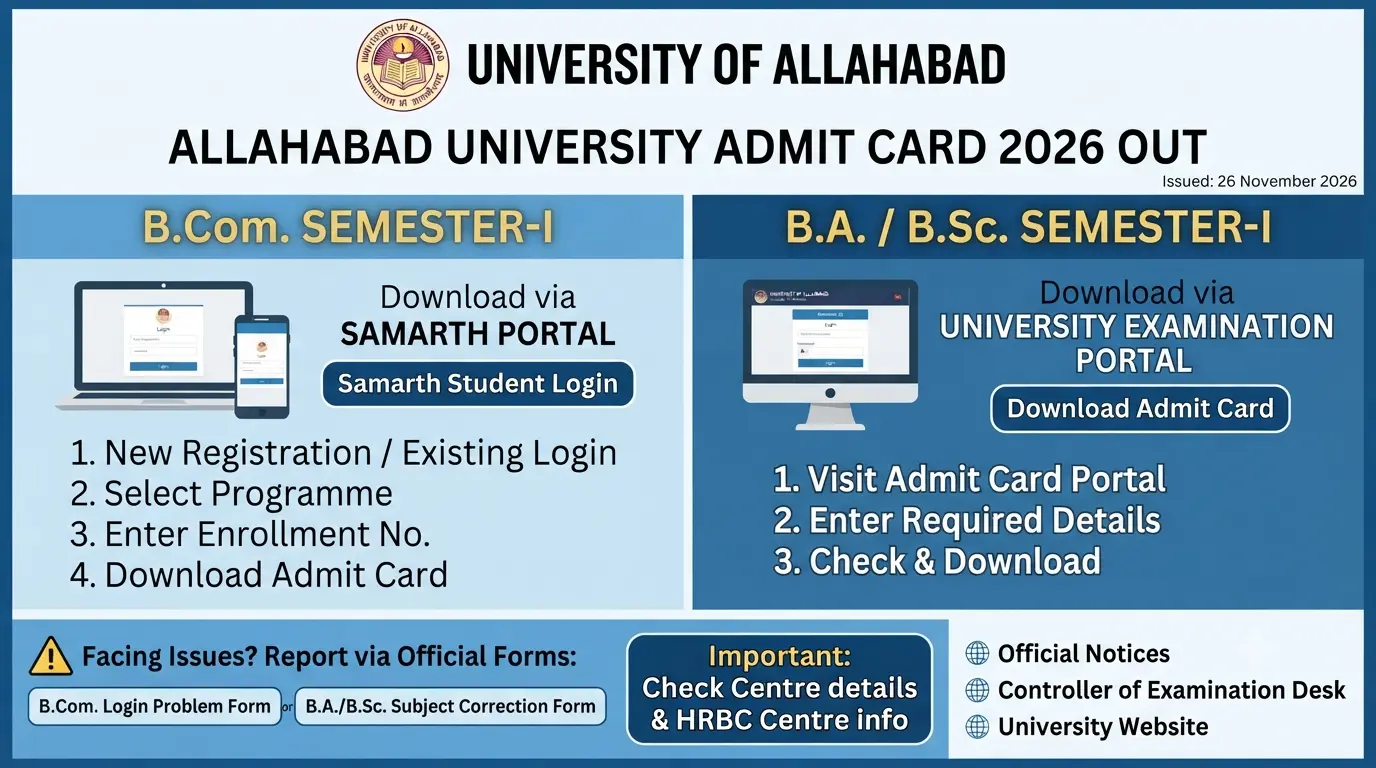
Allahabad University Admit Card 2026: Overview
| Particulars | Details |
|---|---|
| University | Allahabad University |
| Notice Date | 26 November 2026 |
| B.Com. Notice Number | COE/941/2026 |
| B.A./B.Sc. Notice Number | COE/942/2026 |
| Courses | B.Com., B.A. and B.Sc. Semester-I |
| Session | 2026-27 |
| Admit Card Status | Released |
| B.Com. Portal | Samarth Portal |
| B.A./B.Sc. Portal | University Examination Portal |
| Official Notice Page | Controller of Examination Desk |
Allahabad University Admit Card 2026 Download Links
The university has provided separate links for B.Com. and B.A./B.Sc. students. Open the correct link for your course.
| Course | Download Link |
|---|---|
| B.Com. Semester-I | Samarth Student Login |
| B.A./B.Sc. Semester-I | Download Admit Card |
| Official Notices | Check University Notices |
How to Download Allahabad University B.Com. Admit Card 2026
B.Com. students can download their admit cards through the Samarth Portal.
If you have not registered before, follow these steps:
- Visit the Samarth Student Login Portal.
- Click on the green New Registration button.
- Select your programme.
- Enter your name as shown on your ID card, High School Certificate or admission record.
- Select Enrollment Number as your registration method.
- Enter your correct enrollment number.
- Fill in the captcha.
- Check your details and click Submit.
- Enter your email ID and mobile number if the portal asks for them.
- Enter the OTP sent to your email and click Submit.
- Create a password and save it.
- Log in using your enrollment number and password.
- Open your student profile and download your admit card.
If you have already registered, log in directly with your existing details. Allahabad University Admit Card 2026.
How to Download B.A./B.Sc. Semester-I Admit Card 2026
B.A. and B.Sc. students can download their admit cards from the university examination portal.
- Visit the official admit card portal.
- Follow the instructions shown on the screen.
- Enter the details requested by the portal.
- Open and check your admit card.
- Download it and take a printout.
The university notice does not provide separate login instructions for these students. Follow the steps shown on the portal. Allahabad University Admit Card 2026.
What to Do If You Cannot Log In to Samarth?
If you are a B.Com. student and cannot open your Samarth account, report the problem through the official login problem form.
Fill in the required details and submit the form. The university has not announced how long it will take to solve the problem. Allahabad University Admit Card 2026.
B.A./B.Sc. Admit Card Subject Mismatch: How to Fix It?
Sometimes, the subjects printed on your Admission Card may not match those on your Admit Card. The university says this may happen because of admission data synchronisation.
If you find this problem, follow these steps:
- Open the official subject mismatch form.
- Enter the required details.
- Upload a scanned copy of your original Admission Card.
- Upload a scanned copy of your Admission Fee Receipt.
- Submit the form.
Keep both documents ready before filling out the form. Allahabad University Admit Card 2026.
New Examination Centre: HRBC
Allahabad University has added the Harivansh Rai Bachchan Cultural Centre (HRBC) as an additional examination centre for selected Minor papers of B.A./B.Sc. Semester-I.
The notice does not name the Minor papers assigned to this centre. So, check the examination centre printed on your admit card and go to the centre mentioned there.
Details to Check on Your Admit Card
After downloading the Allahabad University Admit Card 2026, check these details carefully:
- Your name
- Enrollment details
- Course and semester
- Subject and paper names
- Examination centre
- Other printed information
If you find any mistake, follow the university’s correction instructions.
Important Instructions for Students
- B.Com. students must use the Samarth Portal.
- B.A./B.Sc. students must use the university examination portal.
- Check your subjects and examination centre carefully.
- Report B.Com. login problems through the official form.
- Report B.A./B.Sc. subject mismatches through the correction form.
- Keep your original Admission Card and Admission Fee Receipt ready.
- Check whether your centre is HRBC or another location.
- Download and print your admit card before the examination.
- Use only the official links given by the university.
Allahabad University Admit Card 2026: Important Links
| Particulars | Direct Link |
|---|---|
| B.Com. Semester-I Admit Card | Samarth Portal |
| B.A./B.Sc. Semester-I Admit Card | Examination Portal |
| B.Com. Login Problem Form | Submit Login Problem |
| B.A./B.Sc. Subject Correction Form | Submit Correction Request |
| Official Notice Page | Controller of Examination Desk |
| University Website | Allahabad University |
Download your Allahabad University Admit Card 2026 from the correct portal. Check your subjects and examination centre before your examination.
Also Check Out:- IBPS RRB Clerk PET Admit Card 2026 OUT, Download Office Assistant PET Call Letter
FAQs
1. Has Allahabad University Admit Card 2026 been released?
Yes. Allahabad University released the admit cards for NEP-based B.Com. Semester-I and B.A./B.Sc. Semester-I for the 2026-27 session on 26 November 2026. The notices are COE/941/2026 for B.Com. and COE/942/2026 for B.A./B.Sc.
2. How can you download Allahabad University Admit Card 2026?
B.Com. students can visit the Samarth Portal at https://allduniv.samarth.edu.in/index.php/site/login. Log in with your enrollment number and password. If you are a new user, complete the registration process using your programme, name and enrollment number. B.A./B.Sc. students can visit https://coe.allduniv.ac.in/admitcard and follow the instructions on the screen.
3. What should you do if you find a mistake or face a login problem?
B.Com. students who cannot access their Samarth accounts can report the problem through the official login issue form. B.A./B.Sc. students who find a subject mismatch should submit the official correction form. You must upload scanned copies of your original Admission Card and Admission Fee Receipt with the correction request.
4. Which examination centre has Allahabad University added for B.A./B.Sc. Semester-I?
Allahabad University has added the Harivansh Rai Bachchan Cultural Centre (HRBC) as an additional centre for selected Minor papers. The notice does not name the papers assigned to this centre. Check your admit card to confirm your examination centre and reach the location printed on it.
