
Screens are now part of our daily lives. You use your phone to talk to people, watch videos, read news, study, work and make payments. Computers and tablets also help you finish many daily tasks. But spending too much time on screens can leave you tired and distracted.
Table of ContentsQuickly navigate to the information you need
If you keep checking your phone, you may find it hard to focus on one task. You may also lose time without noticing it. Too much screen use can affect your sleep, eyes, mood and daily routine.
Learning How to Reduce Screen Time and Clear Mental Clutter can help you take better control of your day. You do not have to stop using your phone or computer. You only need to use them with a clear purpose.
This guide explains How to Reduce Screen Time and Clear Mental Clutter through small steps. You will learn how to control phone use, avoid unwanted notifications, improve your focus and make more time for real-life activities.
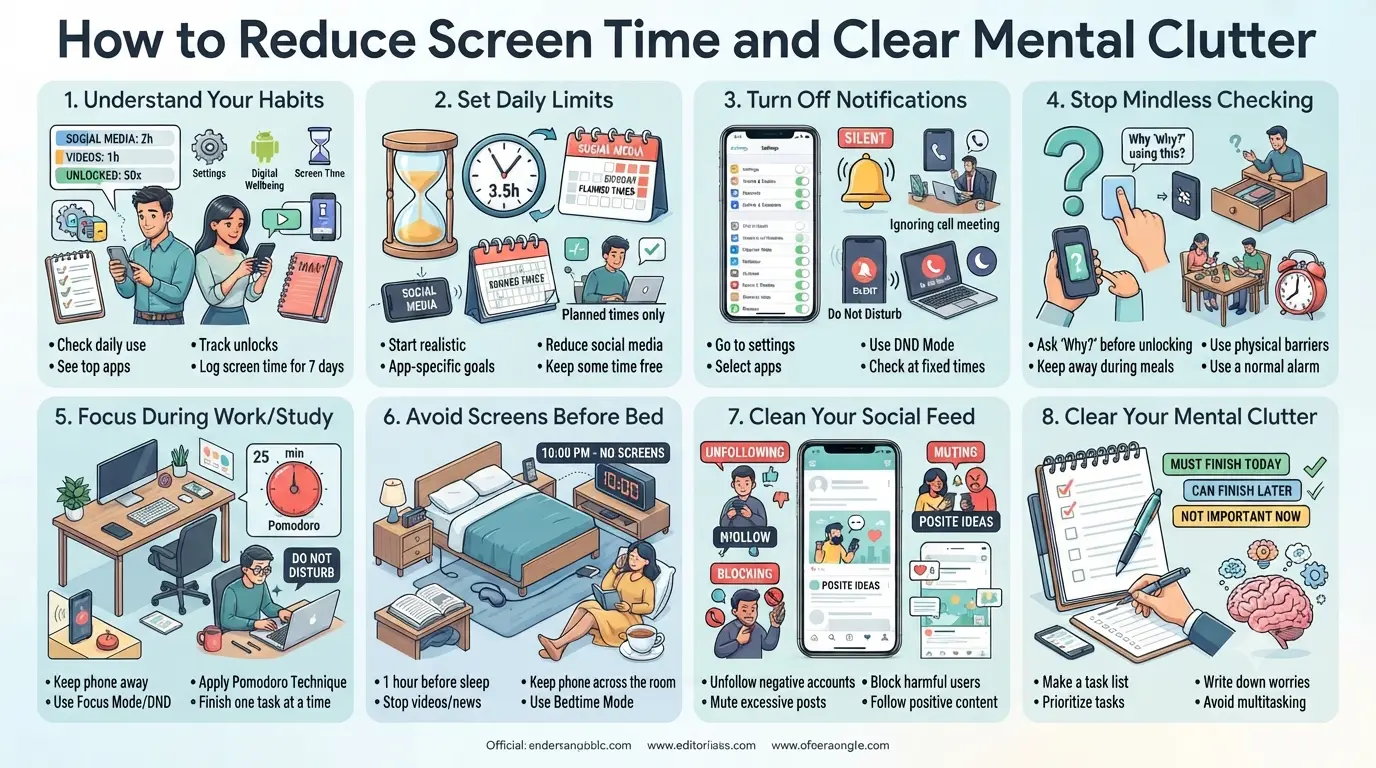
1. Understand Where Your Screen Time Goes
Before you try How to Reduce Screen Time and Clear Mental Clutter, find out how much time you spend on your devices.
Many people think they use their phones for only a short time. But checking social media, watching videos and reading messages can take several hours.
Your first step is to check your daily screen use.
On an Android phone:
- Open Settings.
- Find Digital Wellbeing.
- Check your daily screen time.
- See which apps you use the most.
- Check how many times you unlock your phone.
On an iPhone:
- Open Settings.
- Tap Screen Time.
- Check your daily and weekly reports.
- Find the apps that take most of your time.
- Check how often you pick up your phone.
Write down your daily screen time for seven days. This will help you find your habits.
For example, you may find that you spend two hours on social media and another hour watching short videos. You can then decide where to make changes.
This is the first useful step in How to Reduce Screen Time and Clear Mental Clutter because you cannot control a habit until you understand it.
2. Set a Daily Screen Time Limit
You do not have to reduce your screen time in one day. Start with a small and realistic goal.
For example, if you spend four hours a day on social media, try to reduce it to three and a half hours first. After a few days, lower it again if you feel comfortable.
Set different limits for different apps. You may need more time for work or study than for entertainment.
Try these steps:
- Set a daily limit for social media.
- Reduce time spent watching short videos.
- Avoid opening apps without a reason.
- Check your phone only at planned times.
- Keep some time free from all screens.
Remember that work, study and personal tasks may require screen use. Your goal is to reduce unnecessary use, not stop useful activities.
A daily limit is an important part of How to Reduce Screen Time and Clear Mental Clutter. It gives you a clear target and makes it easier to notice your progress.
3. Turn Off Unnecessary Notifications
Notifications can disturb you many times during the day. A message alert, social media update or shopping offer may take your attention away from your work.
Even if you do not open the notification, the sound or vibration can break your focus.
You can control this problem by turning off alerts that are not important.
Follow these steps:
- Open your phone settings.
- Go to Notifications.
- Check the list of apps.
- Turn off alerts from apps you do not need.
- Keep calls and important messages active.
- Use Do Not Disturb when you study, work or sleep.
You can also turn off notifications from shopping apps, games and social media platforms.
Try checking messages at fixed times instead of replying to every alert. For example, you can check them after breakfast, during lunch and in the evening.
This simple habit can help you follow How to Reduce Screen Time and Clear Mental Clutter without missing important messages.
4. Stop Checking Your Phone Without a Reason
Do you pick up your phone even when there is no new message? Do you open social media just because you feel bored?
This habit can waste a lot of time.
Sometimes, you may open one app to check a message. Then you start watching videos or reading posts. Before you know it, 30 minutes have passed.
To change this habit, ask yourself one question before unlocking your phone:
“Why am I using my phone right now?”
If you have a clear reason, use it and finish the task. If you do not have a reason, put it away.
You can also try these ideas:
- Keep your phone inside a drawer while working.
- Do not carry it from one room to another.
- Avoid checking it every few minutes.
- Keep it away while eating.
- Use a normal alarm clock if you often check your phone at bedtime.
These small changes make How to Reduce Screen Time and Clear Mental Clutter easier to follow in daily life.
5. Keep Your Phone Away During Work and Study
A phone beside you can make it difficult to concentrate. You may feel like checking it even when you have an important task to finish.
Try keeping your phone in another room while you work or study. If you need it for the task, turn on Focus Mode or Do Not Disturb.
You can also follow a simple work routine:
- Choose one task.
- Keep everything you need ready.
- Put away your phone.
- Work for 25 minutes.
- Take a short break.
- Start another work session.
This method is often called the Pomodoro Technique. It uses short work periods and planned breaks.
You can change the time to suit your needs. For example, you may work for 30 or 40 minutes before taking a break.
Do not try to complete many tasks at the same time. Finish one task before moving to another.
If you want to learn How to Reduce Screen Time and Clear Mental Clutter, protecting your work and study time is a good place to start.
6. Avoid Using Screens Before Bed
Using your phone late at night can make it harder to relax. You may plan to watch one video but end up watching many more.
The bright screen and exciting content may also keep your mind active when you should be getting ready to sleep.
Try to stop using your phone at least one hour before bedtime. Use this time to prepare for the next day and relax.
You can follow these simple habits:
- Keep your phone away from your bed.
- Stop watching videos before sleeping.
- Avoid reading stressful news at night.
- Set a fixed time to go to bed.
- Read a printed book or listen to calm music.
- Keep your bedroom quiet and comfortable.
You can also use Bedtime Mode or Sleep Focus on your phone. These settings can reduce alerts and make the screen less distracting.
The goal of How to Reduce Screen Time and Clear Mental Clutter is not only to save time. It is also to create a healthier daily routine.
7. Clean Your Social Media Feed
The content you watch can affect your mood and thoughts.
If your social media feed is full of negative news, arguments, unwanted videos and unrealistic lifestyles, you may feel worried or unhappy.
You do not have to follow every account. Keep only the pages and people whose content is useful or enjoyable.
Try these steps:
- Unfollow accounts that make you feel unhappy.
- Mute pages that post too often.
- Block harmful or abusive accounts.
- Avoid reading every online argument.
- Stop following repeated negative news updates.
- Choose pages that teach useful skills or share positive ideas.
You should also avoid comparing your life with pictures and videos online. People often share only selected parts of their lives. What you see on social media may not show their full reality.
Cleaning your feed is another useful way to practise How to Reduce Screen Time and Clear Mental Clutter.
8. Make a List to Clear Your Mind
Mental clutter happens when too many thoughts, tasks and worries stay in your mind at the same time.
You may think about unfinished work, bills, messages, family tasks and future plans. When all these thoughts come together, it can become difficult to focus.
A simple task list can help.
Take a notebook and write down everything you want to do. Do not worry about the order at first. Just put your thoughts on paper.
Then divide the tasks into three groups:
- Tasks you must finish today.
- Tasks you can finish later.
- Tasks that are not important right now.
Choose the most important task and start working on it.
You can also write down worries that you cannot solve immediately. Decide when you will think about them again. This can help you avoid going over the same thoughts throughout the day.
A simple list can make How to Reduce Screen Time and Clear Mental Clutter easier because it gives your mind fewer things to remember.
9. Stop Doing Too Many Things at Once
Many people try to do several things together. They watch videos while eating, reply to messages while working and check social media while studying.
This can make it harder to give proper attention to one task.
Instead, try to do one thing at a time.
For example:
- When you eat, focus on your food.
- When you study, focus on your lesson.
- When you talk to someone, listen to them.
- When you work, avoid opening unrelated apps.
- When you rest, allow yourself to relax.
You may finish tasks faster when you give them your full attention.
Single-tasking is a simple habit that can support How to Reduce Screen Time and Clear Mental Clutter.
10. Spend More Time Outside
If most of your free time goes to your phone, try spending more time outside.
You do not have to plan an expensive trip or join a sports club. Simple activities can help you take a break from screens.
You can:
- Walk in a nearby park.
- Ride a bicycle.
- Play a sport.
- Visit a friend.
- Spend time with family.
- Work in your garden.
- Visit a library.
- Explore a new place in your area.
Outdoor activities also give you a chance to move your body and enjoy your surroundings.
Try going for a 20- or 30-minute walk every day. Leave your phone in your pocket unless you need it for an important reason.
Adding offline activities to your day is an important part of How to Reduce Screen Time and Clear Mental Clutter.
11. Take Regular Breaks From Screens
If your work requires you to use a computer for many hours, you may not be able to reduce that screen time easily.
However, you can take regular breaks.
Stand up, stretch your body and look away from the screen. Walk around for a few minutes if possible.
You can also follow the 20-20-20 rule to reduce eye strain:
- After every 20 minutes,
- Look at something about 20 feet away,
- For at least 20 seconds.
This rule gives your eyes a short break from close screen work. It does not replace proper eye care or a visit to an eye specialist when needed.
The Indian National Health Mission also includes screen breaks and the 20-20-20 rule in its screen-use guidance. National Health Mission+1
Regular breaks are useful when learning How to Reduce Screen Time and Clear Mental Clutter, especially if you work or study online.
12. Create Screen-Free Areas at Home
You do not have to use your phone in every room.
Choose a few places where you will not use electronic devices unless necessary.
For example:
- Dining table: Keep phones away during meals.
- Bedroom: Avoid scrolling while lying in bed.
- Study area: Use your phone only for study-related work.
- Family area: Spend some time talking without screens.
You can also make family meals screen-free. This gives everyone a chance to talk and spend time together.
If you live with family members, ask them to follow the same rules. It may become easier when everyone takes part.
Creating screen-free areas is a practical step in How to Reduce Screen Time and Clear Mental Clutter.
13. Use Your Phone’s Focus and Wellbeing Tools
Your phone already has tools that can help you control your screen habits. You do not always need to download another app.
Android users can check Digital Wellbeing. It includes tools such as:
- App timers to limit time on selected apps.
- Focus Mode to pause distracting apps.
- Bedtime Mode to reduce interruptions at night.
- Do Not Disturb to silence alerts.
Google explains how to use these features in its official Android help guide. Android Help
iPhone users can use Screen Time to check usage and set limits. Focus settings can also help reduce interruptions.
Use these tools to support your plan. Do not depend on them alone. You still have to make a choice about when and why you use your devices.
These settings can make How to Reduce Screen Time and Clear Mental Clutter easier to follow every day.
14. Take a Short Digital Break
A digital break means spending some time away from unnecessary screen use.
You do not have to stop using every device for a full day. Start with a short period that you can manage.
For example:
- Keep the first 30 minutes after waking up screen-free.
- Spend one hour in the evening without social media.
- Avoid phones during meals.
- Take a walk without watching videos.
- Spend Sunday morning doing offline activities.
You can slowly increase this time as you become comfortable.
During your break, do something you enjoy. Read a book, cook, exercise, meet a friend or listen to music.
A digital break can help you notice how often you reach for your phone without thinking. It can also help you decide which online activities are useful and which ones waste your time.
This is one of the practical methods in How to Reduce Screen Time and Clear Mental Clutter.
15. Organise Your Digital Life
Digital clutter can also make your mind feel busy.
Your phone may have hundreds of unread emails, old files, unused apps and repeated pictures. Finding something important can then take more time.
Spend a little time cleaning your devices.
Follow these steps:
- Delete apps you no longer use.
- Remove old screenshots and unwanted pictures.
- Organise files into folders.
- Unsubscribe from unwanted emails.
- Clear unnecessary notifications.
- Remove browser tabs you no longer need.
- Keep important documents in clearly named folders.
You can also organise your computer desktop. Keep only the files you need for your current work.
Do not delete important documents without checking them first. Keep a backup of files that you may need later.
A clean digital space can support How to Reduce Screen Time and Clear Mental Clutter by making your devices easier to use.
16. Choose What You Want to Watch or Read
One reason people spend too much time online is that they do not decide what to watch before opening an app.
They start scrolling and keep watching whatever appears next.
You can change this by choosing your content before you go online.
For example, if you want to learn Excel, open a lesson and watch it. When the lesson ends, close the app.
If you want to watch a film, choose one film instead of scrolling through videos for an hour.
Before opening an app, decide:
- What do I want to do?
- How much time will I spend?
- What will I do after finishing?
This simple plan can help you avoid unnecessary screen use.
It is also a useful habit when practising How to Reduce Screen Time and Clear Mental Clutter.
17. Make Time for Hobbies
Hobbies give you something enjoyable to do without spending hours on your phone.
Choose activities that match your interests. You do not have to be an expert at them.
You can try:
- Reading books.
- Drawing or painting.
- Cooking new dishes.
- Gardening.
- Playing cricket, football or badminton.
- Learning a musical instrument.
- Writing in a diary.
- Practising yoga.
- Learning a new language.
Start with 15 to 30 minutes a day. Increase the time if you enjoy the activity.
You can also learn a new skill through offline books or practical classes.
Replacing unnecessary scrolling with hobbies is another way to follow How to Reduce Screen Time and Clear Mental Clutter.
18. Learn to Say No to Unnecessary Online Activities
You may receive many messages, invitations and requests every day. You may also feel pressure to reply immediately.
But you do not have to be available all the time.
Set clear limits with friends, family and work contacts. Tell them when you are busy or when you usually check messages.
For example, you can say that you do not check work messages late at night unless there is an emergency.
You can also leave online groups that no longer provide useful information.
The aim is not to avoid people. It is to make sure online communication does not control your whole day.
Setting boundaries is an important part of How to Reduce Screen Time and Clear Mental Clutter.
19. Follow a Simple Daily Routine
A daily routine can help you use screens with more care. You do not need a strict timetable. Just decide when you will work, rest and use your phone.
Here is an example of a simple routine.
| Time | Activity |
|---|---|
| Morning | Wake up, freshen up and avoid social media |
| After breakfast | Check important messages |
| Work or study time | Focus on your main tasks |
| Afternoon | Take a break and have lunch without a phone |
| Evening | Walk, exercise or enjoy a hobby |
| Night | Finish important messages and prepare for the next day |
| Before bed | Keep your phone away and relax |
This table gives you an example of how to balance screen use with other activities. You can change the times to match your work, study and family routine.
Following a daily plan can make How to Reduce Screen Time and Clear Mental Clutter easier because you will have a clear idea of what to do next.
20. Review Your Progress Every Week
Do not expect your habits to change overnight. You may use your phone more than planned on some days. That does not mean you have failed.
Check your progress once a week.
Ask yourself:
- Did I reduce unnecessary screen time?
- Which app took most of my time?
- Did I sleep better?
- Did I finish my important tasks?
- Did I spend more time with family or friends?
- Which habit was difficult to follow?
If one method does not work, try another. For example, if app limits do not help, keep your phone in another room while working.
You can also write your weekly screen time in a notebook. Compare it with the previous week.
This helps you understand whether How to Reduce Screen Time and Clear Mental Clutter is working for your daily life.
21. Common Mistakes You Should Avoid
Some habits can make it harder to reduce screen time. Try to avoid these mistakes.
Trying to stop all screen use at once: You may need screens for work, study and daily tasks. Reduce unnecessary use instead of setting an impossible target.
Keeping every notification active: Too many alerts can disturb your work. Keep only the important ones.
Using your phone in bed: This can delay your sleep and make it harder to relax.
Replacing one app with another: If you stop using one social media app but spend the same time on another, your total screen time may not change.
Making a plan that is too strict: Start with small changes that you can follow for a long time.
Ignoring offline activities: You need time for exercise, hobbies, family and friends. Do not replace every free moment with screen use.
Expecting quick results: Building a new habit takes time. Keep practising and review your progress.
Avoiding these mistakes can help you follow How to Reduce Screen Time and Clear Mental Clutter for a longer period.
22. When Should You Seek Help?
Sometimes, screen use becomes difficult to control. You may keep using your phone even when it affects your sleep, work, studies or relationships.
You may also feel worried, angry or restless when you cannot check your phone.
If these problems continue and affect your daily life, consider speaking with a qualified mental health professional. You can also seek help from a doctor if you have ongoing headaches, eye problems or sleep difficulties.
Do not feel ashamed about asking for help. The right support can help you understand your habits and make healthy changes. How to Reduce Screen Time and Clear Mental Clutter.
Conclusion
Your phone and computer are useful tools. You do not have to stop using them to live a better life. You only need to control how and when you use them.
Start by checking your screen time. Set daily limits, turn off unwanted notifications and keep your phone away while working or sleeping. Spend more time outside, enjoy hobbies and make room for real-life conversations.
How to Reduce Screen Time and Clear Mental Clutter is not about avoiding technology. It is about using technology in a way that supports your daily life.
Start with one or two small changes today. Follow them regularly and add more changes when you feel ready. With time, you can build better screen habits, protect your free time and give more attention to the things that matter. How to Reduce Screen Time and Clear Mental Clutter.
Official and Trusted Sources
The following sources provide more information about healthy screen habits, digital wellbeing and ways to manage distractions.
- eSafety Commissioner – How to Manage Your Screen Time
- Google Android – Digital Wellbeing and Screen Time Tools
- National Health Mission – Screen Use Guidelines
- Indian Psychiatric Society – Recommendations for Screen Use
- American Medical Association – Tips to Reduce Screen Time
- Harvard Health – Understanding Digital Overload
Also Check Out:- GIMS VRDL Recruitment 2026 Notification OUT for DEO, MTS and More Vacancies, Check Application Details
FAQs
1. How can you reduce screen time every day?
Start by checking your daily screen time through Digital Wellbeing on Android or Screen Time on iPhone. Set daily limits for social media and video apps. Turn off unnecessary notifications and avoid checking your phone without a reason. Keep your phone away while working, studying, eating and sleeping. Make small changes every week so that you can follow them easily. How to Reduce Screen Time and Clear Mental Clutter.
2. How does too much screen time affect your daily life?
Too much screen time can make it harder to focus on your work or studies. It may also disturb your sleep, cause eye strain and reduce the time you spend with family and friends. Constant notifications and social media updates can make you feel distracted. Taking regular breaks and reducing unnecessary screen use can help you build healthier habits. How to Reduce Screen Time and Clear Mental Clutter.
3. How can you clear mental clutter and improve focus?
Write your daily tasks and worries in a notebook. Divide your tasks into important and less important groups. Finish one task at a time instead of doing many things together. Turn off unwanted notifications, clean your social media feed and take short breaks. Reading, walking, exercising and enjoying hobbies can also give your mind a break. How to Reduce Screen Time and Clear Mental Clutter.
4. What is the best way to build healthy screen habits?
Create a daily routine with fixed times for work, study and entertainment. Avoid using your phone before bedtime and keep screen-free areas at home, such as the dining table and bedroom. Take regular breaks, spend time outdoors and enjoy offline activities. Check your screen time every week to see your progress. Start with small changes instead of trying to stop all screen use at once.
